 OiYOi
OiYOiStudent guide
Register with a GP
Register in your first week – don't wait until you're ill. Leave it until the day you're poorly and you'll just have to tough it out while the registration goes through.
Fill in the GP form with meAnswer a few questions, get every answer in English- How long
- About 15 minutes online, and it has to be done in one go (close it and you start again); surgeries usually complete your registration within 1 to 5 working days
- What you need
- As long as you're in England, you can register, and it's free. You don't need ID, proof of address, a visa or proof of immigration status, or an NHS number
- What you get
- You're a registered patient at the surgery – which is what lets you book appointments, get prescriptions and be referred to specialists
The short version
Registering is free, and it's the master switch for healthcare in the UK – without a GP you can't book appointments, get prescriptions or be referred to a specialist. Unlike in some countries, you can't just book yourself in at a hospital: you need a GP to refer you to a specialist.
The key point: nobody checks your documents
This is where lots of people get stuck, thinking they have to wait for their eVisa, a bank account or proof of address. You don't.
In the NHS's own words, you don't need ID, proof of address or proof of immigration status to register. Having an NHS number makes it easier for the surgery to find your records, but you can register without one. As long as you're in England, you can register, and it's free.
In other words: still sorting out where you'll live, documents still in progress, no bank account yet – you can still register. If the receptionist asks to see ID, you can tell them you know you don't need any to register. You can even register with no fixed address: use a temporary address, or the surgery's own.
Walk through it with screenshots
Every step below shows what that screen really looks like. Screenshots taken on 5 September 2026. Websites change – if the page doesn't match the picture, go by the website, and let us know.
Step 1 · First, the bit that matters: you don't need any documents
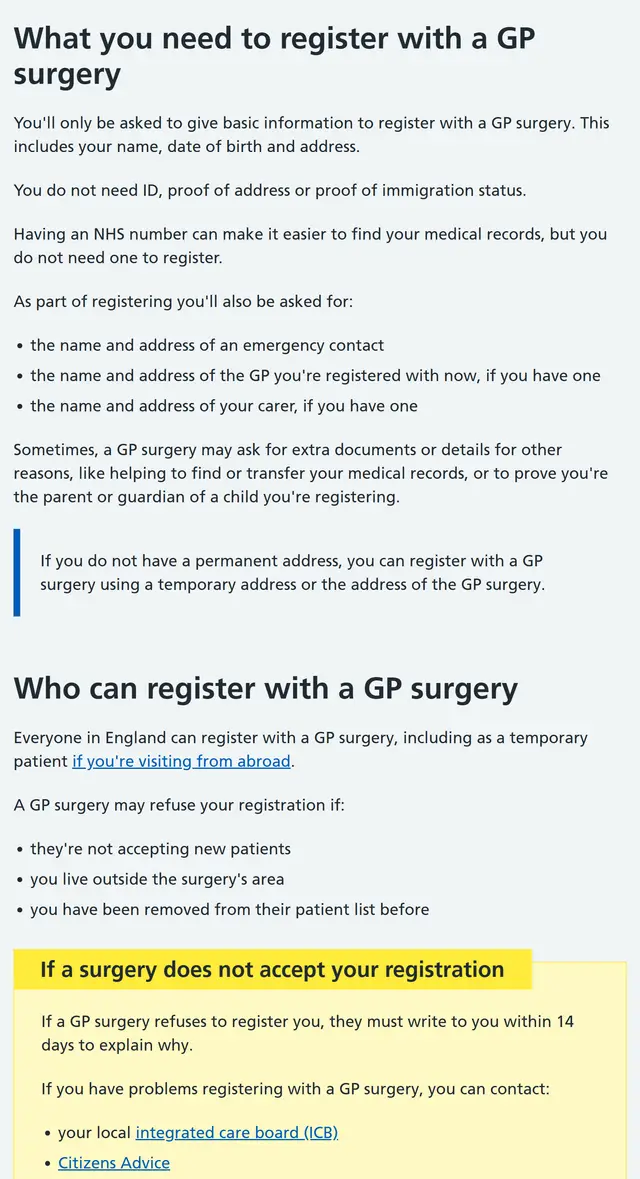
Open the NHS page and read this line first: "You do not need ID, proof of address or proof of immigration status."
Why start here rather than going straight to the form? What stops most people isn't the form – it's wondering "do I even qualify yet?" Read that line once and you won't second-guess yourself again.
Step 2 · Search by postcode
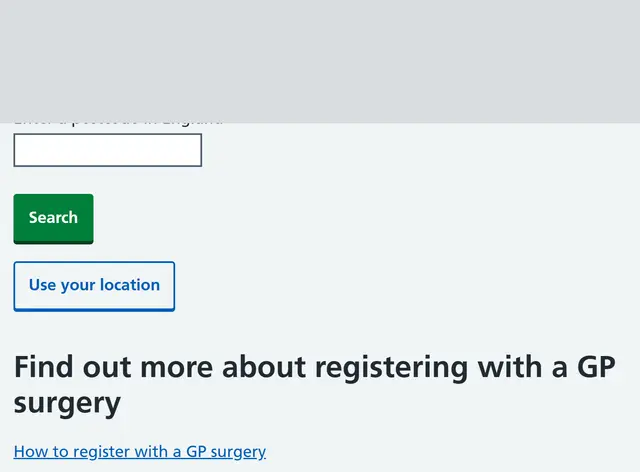
This screen has just one box, labelled "Enter a postcode in England".
- Enter a postcode, not a street address – the postcode of where you live, not your uni's.
- Postcodes look like
WC1E 6BT. The space in the middle is optional. - There's also "Use your location" if you can't be bothered typing – but you'll need to be near home.
Step 3 · Only two badges matter on the results page
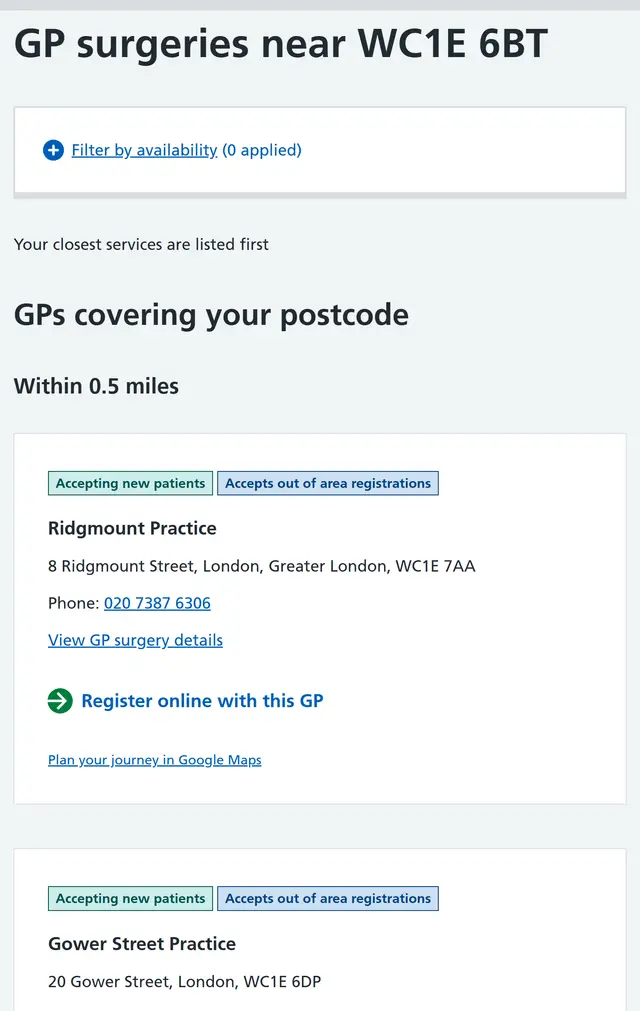
Results are listed nearest first. Each surgery has badges above its name, and you only need to know two:
This corrects an earlier version of this guide. It used to say "you might be turned away if you live outside the catchment area, so search near where you live". Going through it ourselves, we found the page turns this into a badge. You don't need to guess whether you're in the area – the badge tells you at a glance.
Once you've picked one, tap "Register online with this GP" under that surgery (the one with the green round arrow).
Step 4 · Read these three numbers before you start
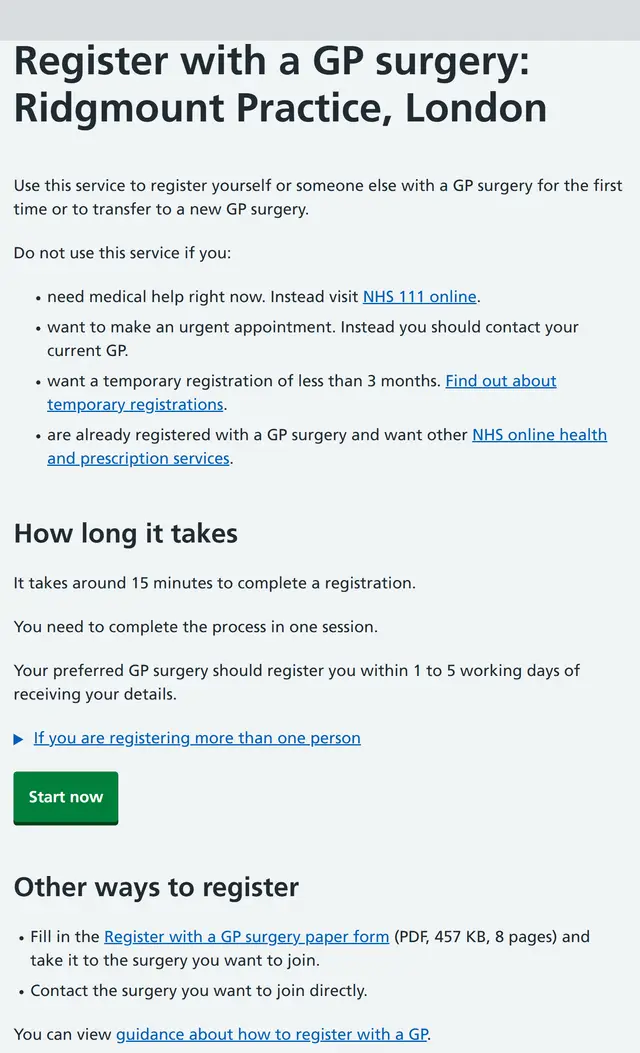
This takes you to a national registration service (not a form each surgery makes itself). There are three numbers on this screen – read them before you tap Start now:
- About 15 minutes per person.
- "You need to complete the process in one session." – you have to finish in one go. Close the tab, lose signal or wander off to find your passport number and you're back to the start. So have your passport next to you before you begin.
- The surgery will register you within 1 to 5 working days of receiving your details.
The screen also tells you when not to use this service: if you need medical help urgently (use NHS 111 online), need emergency care, or only want a temporary registration for less than 3 months (that's a different route).
Step 5 · Question one: who's registering?
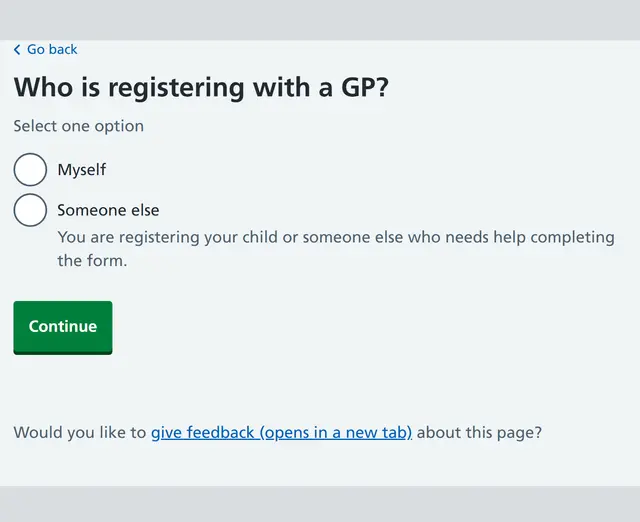
This is the first screen after Start now. Registering yourself? Choose Myself.
(Someone else is for registering a child, or someone who can't fill in the form. Choose it if you're filling it in for a friend, too.)
Step 6 · Question two: first time with a UK GP?
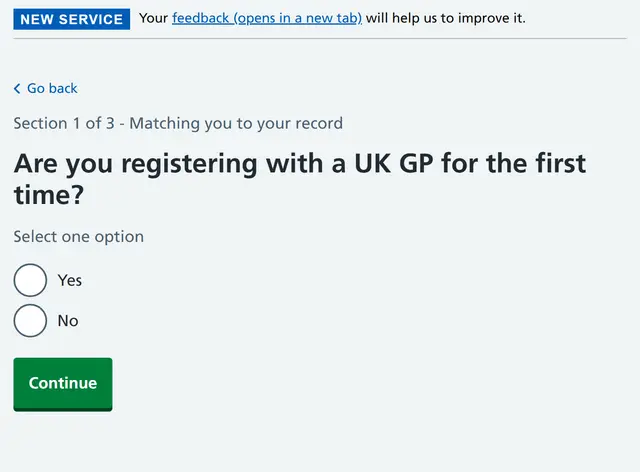
First, look at the small print at the top: "Section 1 of 3 – Matching you to your record". The form has three sections and you're on the first – worth knowing, so it doesn't feel endless halfway through.
"Are you registering with a UK GP for the first time?" If you've just arrived and have never seen a GP in the UK, choose Yes.
Step 7 · Question three: your legal name, as on your passport
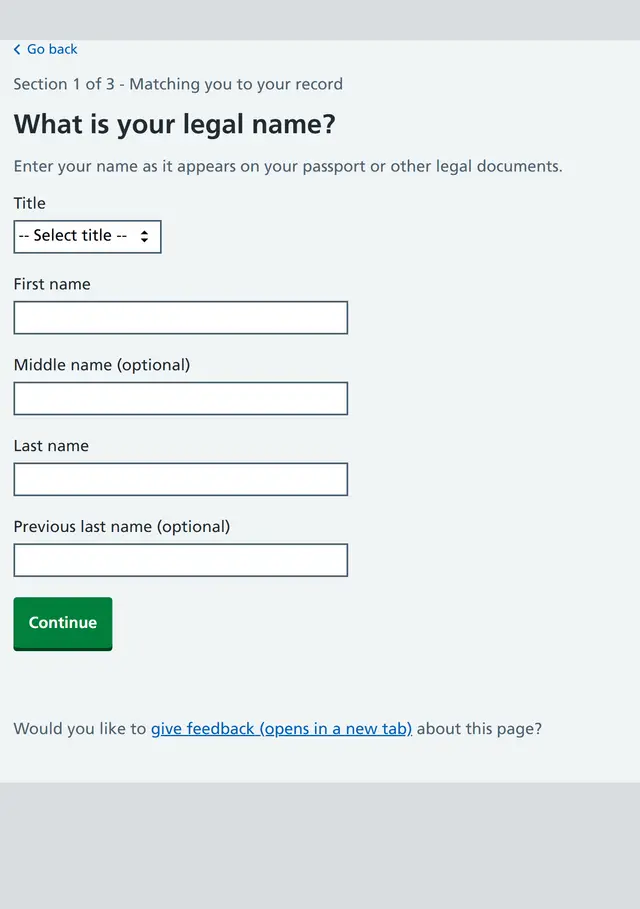
This is the screen people most often get wrong, and if you get it wrong, your records won't match up later. The page itself says: "Enter your name as it appears on your passport or other legal documents."
- First name = your given name, Last name = your surname (family name). Copy them exactly as your passport shows them, and if you'd normally put your family name first, don't do that here.
- Title is a dropdown (Mr / Mrs / Miss / Ms / Dr / Mx / Master / Other) – pick whichever fits.
- Middle name and Previous last name are both marked (optional) – leave them blank if you haven't got one. Don't make one up.
After that it's your date of birth, address, contact details and an emergency contact. Copy them from your passport and your tenancy agreement – no traps.
Once you've sent it
The surgery will usually let you know within 1 to 5 working days of getting your details that you're registered, though it can take longer. Don't expect to get an appointment until then.
A myth that gets passed round: "If you're not registered with a GP, A&E will cost you a fortune"
Wrong. A&E and Urgent Treatment Centres are free for everyone, whatever your immigration status; and because you paid the IHS (Immigration Health Surcharge) with your visa, hospital treatment beyond A&E is free too. So the reason to register isn't "so I don't get charged". It's so someone looks after the small stuff, your prescriptions are cheap, and someone can refer you when you need it - A&E is for emergencies. Turn up there with a cold and a temperature and you're the one queuing for six hours.
The five things people ask most once they've registered
This guide covers England. Scotland, Wales and Northern Ireland have their own GP systems (so if posts from Glasgow or Edinburgh don't match these steps, that's why) – go by the local NHS pages.
Easy traps
- Waiting until your paperwork is sorted before you register. The most common mistake, and the one that costs you most – as above, there's nothing to wait for.
- Closing the page halfway through. The form doesn't save a draft, so close it and you start again. Have your passport handy and don't use a connection that might drop.
- Not re-registering after you move. A new area may be outside your old surgery's catchment, so register again once you've moved. You don't need to tell your old surgery first – once you're registered, the system lets them know automatically.
- Booking a GP for every little thing. GP appointments are hard to come by. For headaches, colds, allergies and minor injuries, ask the pharmacist at a pharmacy first - no appointment, and you can get medicine there and then.
- Not sure whether you need a doctor, so you just wait. Call 111 (free) and it'll tell you whether to look after yourself, go to a pharmacy, book a GP or go straight to A&E.
A word of advice (practical, not an official rule)
The form asks for your contact details, and surgeries mostly get in touch by phone and text. So getting a UK mobile number before you fill it in makes things smoother – but that's practical advice, not something the NHS requires, and not having a UK number is no reason to put off registering.
What to say at the GP: phone, reception and 111 scriptsThree minutes to read; skim it again before you call
These are scripts, not facts. The phrases are our own wording. For the actual rules, see "Register with a GP", "Gynae problems: sexual health clinic, GP or A&E?" and "Toothache? Don't wait it out".
The short version
When people get stuck seeing a doctor, it's rarely the rules. It's actually saying the words: you can't get through on the phone, you can't explain yourself at reception, you can't answer 111's questions. Each card has three parts: the situation / what you say / what they might say back, and how you reply. Save them on your phone and read them out.
Card 1 · Phoning to book a GP appointment
- The situation: the phone lines are hardest to get through on the moment the surgery opens in the morning. If it's engaged, keep redialling.
- You say: Hello, I'd like to book an appointment with a GP, please. My name is ..., date of birth ...
- They might say: What is it regarding? / Is it urgent? You reply: It's about ... (your symptom in one sentence). It's been ... days. It's not an emergency, but it's getting worse. / It's urgent, I'm in a lot of pain. (It's up to you to say how urgent it is. Say "urgent" and you'll usually be seen that day or the next; say "routine" and you could wait a week or two.)
Card 2 · Asking for an interpreter (free)
- The situation: you're worried you won't follow the medical words.
- You say: Could I have an interpreter for the appointment, please? [Your language]. (NHS trusts provide interpreters by phone, in person or by video. Ask when you book, not when you turn up.)
Card 3 · At reception
- You say: Hi, I have an appointment at ... with Dr .... My name is ...
- They might say: Take a seat, the doctor will call your name. You reply: Thank you. Could you tell me how to pronounce the doctor's name? / Which room?
Card 4 · With the doctor (three lines is plenty)
- Lead with the main thing: My main problem is ... It started ... It is getting worse / the same / better.
- Say what's worrying you: I'm worried it might be ...
- Pin down what happens next: What should I do next? Do I need a referral? When should I come back? (Before you leave, always ask: What are the next steps? Skip it and you'll have forgotten by the time you're out the door.)
Card 5 · When you don't understand
- You say: Sorry, could you say that again more slowly? / Could you write that down for me, please?
- Then ask: Could I take a photo of that? (Snap any drug names or diagnoses the doctor writes down.)
Card 6 · Calling 111 (no registration, 24 hours a day)
- The situation: the surgery's shut, you're not sure whether you need A&E, or toothache is keeping you up all night.
- You say: Hello, I need medical advice. My name is ..., date of birth ..., postcode ... My problem is ...
- They might say: a run of checklist questions (can you walk, have you got a temperature, how bad is the pain, what have you taken for it). You reply: answer honestly, and if you don't know, say "I'm not sure". Don't play your symptoms down: 111 decides how urgent you are from your answers.
- The callback: 111 can take a few hours to ring back, possibly in the middle of the night. Keep your phone off silent.
Card 7 · Flagging warning signs at A&E reception
- You say: I have sudden severe pain and I feel faint. / I've taken ... and it's not helping. (The triage nurse puts people in order based on what they say. If you have any of the warning signs in step 4 of "Gynae problems: sexual health clinic, GP or A&E?", say that exact word.)
Three lines that work anywhere
- I'm sorry, my English isn't very good. Could you please speak slowly?
- Could you write that down, please?
- What are the next steps?
Where people trip up
- Making something urgent sound routine: you end up waiting two weeks.
- Asking for an interpreter on the day: ask when you book.
- Leaving without asking about next steps: then realising at home you didn't follow it.
- Treating the scripts as rules: the factual guides have the actual rules.
Contains public sector information licensed under the Open Government Licence v3.0.
Official pages
Checked against official pages on 5 Sep 2026.
Screenshots are from the official websites, used under the Open Government Licence v3.0 with logos removed. They are not official and OiYOi is not affiliated with the NHS or gov.uk.
Not official advice. Rules change, so always check the official page.